.avif)
TL;DR
- A proper LinkedIn automation audit runs on two tracks and 7 checks: one for reply rates, one for account safety. A slipping reply rate and a ban risk usually share the same root cause.
- The 2026 benchmarks to measure against: 28.5% connection acceptance (across 13.2M Expandi-tracked requests), 10.4% platform-wide message reply rate, and a good reply rate of 10-25% (top performers hit 30-50%).
- Personalization barely moves acceptance (26.42% with a note vs 26.37% without) but lifts your post-accept reply rate 72%, so fix the DM, not the connection note.
- Stay inside the safe zone: 15-25 invites a day, under 100 a week. Crossing it triggers restrictions, from a short freeze to a multi-day account lock.
- SalesRobot passes both tracks by design: mobile API with residential IP rotation clears the risk track, AI Variables clears the reply-rate track, and customers average a 55% reply rate with zero reported bans on Safe Mode.
- Highest-impact takeaway: audit monthly, and re-run all 7 checks immediately whenever a core metric drops more than 20% from a stable baseline.
👉 Skip the manual guesswork: SalesRobot keeps you inside safe limits and personalizes every message automatically. Try free for 14 days.
Your Automation Is Running, But Is It Actually Working?
You set up your LinkedIn automation months ago, hit "go," and moved on to something else.
That was the plan, right? Set it and forget it.
Then two things happened. Your reply rate quietly slid off a cliff, and you read that on 25 March 2026, LinkedIn removed HeyReach's company page and restricted the personal profiles of its CEO, CTO, CRO, and CMO.
Suddenly "set it and forget it" feels less like automation and more like leaving the stove on.
Here's the thing most guides get wrong. They treat reply rates and account safety as two separate problems. They're not. A misconfigured LinkedIn automation setup usually leaks performance and invites risk at the same time.
This post is a single diagnostic pass, two tracks and 7 checks, that fixes both.
The Two-Track LinkedIn Automation Audit (Your Diagnostic Framework)
A good LinkedIn automation audit runs on two tracks: a Performance track (are you getting replies?) and a Risk track (is your account safe?). Together they cover 7 checks, each tied to a metric, a 2026 safe threshold, and a specific fix.
Why both tracks in one pass? Because the failures overlap.
A pile of un-accepted invitations tanks your acceptance rate and signals "automation service" to LinkedIn. Missing stop conditions annoy prospects and create compliance risk. Fix one track in isolation and you'll keep bleeding from the other.
Here's the full framework. Print it, bookmark it, run it monthly.
Thresholds are vendor-consensus estimates for 2026. LinkedIn does not publish a single official safe limit, so every "safe number" is an estimate, not a policy.
Step 1: Measure Your Baseline Metrics Before Touching Anything
Before you change a single setting, pull the last 2-4 weeks of data for all four performance metrics: connection acceptance rate, post-accept reply rate, connection-note reply rate, and meetings booked.
This is the step everyone skips, and it's the one that makes the rest of the audit meaningful.
If you start editing campaigns without a baseline, you'll never know what actually moved the needle. You're just guessing with extra steps.
Here are the 2026 numbers to measure yourself against. The connection acceptance benchmark is 28.5% across 13.2 million Expandi-tracked requests. The platform-wide message reply rate sits at 10.4%.
One number worth flagging: the connection-note reply rate dropped from 3.5% in May 2025 to 2.2% in April 2026, a 37% relative decline in a single year. If your note replies look weak, that's partly the market, not just you.
For example, you could open a simple spreadsheet with four columns (invites sent, invites accepted, replies, meetings) and calculate each rate for the trailing 30 days. That single sheet is your entire baseline.
Step 2: Diagnose Which Layer Is Actually Broken
Now run your baseline through a three-branch decision tree to find the actual broken layer before you touch anything.
Fixing the wrong layer is the fastest way to waste a week.
Here's the tree:
- Low acceptance rate → targeting or profile problem. Your ideal buyers aren't accepting, or your profile doesn't earn the click.
- High acceptance but low replies → messaging problem. They connected, then your opener fell flat.
- Strong replies but few meetings → offer or CTA problem. The conversation happens; the ask doesn't land.
For example, if your acceptance is 32% but your reply rate is 6%, your profile and targeting passed the test. Your opening message didn't. Stop rewriting your headline and go fix the DM.
That messaging branch is the most common one, and it usually comes down to personalization. SalesRobot's AI Variables feature exists precisely for this: it pulls real details from each prospect's LinkedIn profile so the message doesn't read like a template.

More on that in Step 3, because the data on personalization is sharper than most people think.
Step 3: Audit Your Message Personalization (The Reply-Rate Lever)
If Step 2 pointed you at a messaging problem, this is where you fix it. Review every message template in your active sequences against a three-point personalization checklist.
- Does it reference something real from their profile? A recent job change, a company milestone, a shared connection, anything that proves a human looked.
- Does the personalization live in the DM after acceptance, not buried in the connection note?
- Is the first sentence about them, not you?
Point two is where most people get it backwards, and the data is blunt about it.
Adding a personalized connection note barely changes acceptance at all: 26.42% with a note vs 26.37% without. But personalization in the message after they accept lifts the post-accept reply rate 72%, from 5.44% to 9.36%.
Translation: the connection note is not your lever. The DM is.
That's also why chasing note replies in 2026 is a losing game. The note reply rate has fallen 37% year over year. Put your effort where the replies actually happen.
Here's the manual reality. Personalizing the opening DM for every prospect means opening each profile, reading it, and writing a custom line. Fine for 20 prospects. Impossible for 2,000.
The SalesRobot way: AI Variables automatically pulls recent job changes, company news, shared connections, and even volunteer work from each prospect's profile and drops it into the message. It reads like you wrote each line by hand, at a scale no human can match.
And Smart Comments can leave an AI-generated comment on a prospect's post before you connect, warming them up first so your request lands with a familiar name attached. It's how SalesRobot customers hit a 55% average reply rate and 51% acceptance rate, comfortably above the 2026 benchmarks you just measured against.
If you want a head start on the actual wording, these LinkedIn follow-up templates are a good place to steal structure from.
Step 4: Check Your Sending Volumes Against 2026 Safe Limits
Open your tool's activity log and compare your last 14 days of sends against the 2026 safe limits.
This is check #5, the first on the Risk track, and it's the one that gets accounts frozen.
The vendor-consensus safe zone for 2026 looks like this:
- 15-25 connection invites per day, with a weekly ceiling around 100.
- 40-80 messages per day to 1st-degree connections.
- 150-300 profile views per day.
New accounts don't get to start there. A fresh or lightly-used account should ramp at 5-10 invites per day for the first two to three weeks, then step up to the 15-25 range once it's warmed.
Why does this matter so much? Because crossing the line has a clear consequence ladder. A Tier 1 restriction temporarily disables features for 1 to 24 hours (search limited, invites paused) and usually unlocks automatically with a warning email.
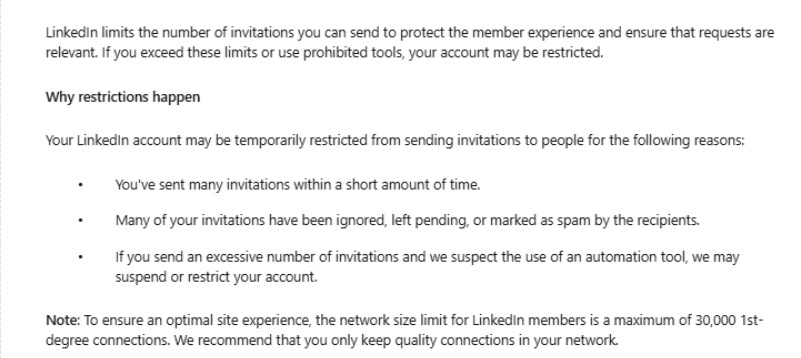
A Tier 2 restriction locks the account for 3 to 14 days and requires ID verification.
LinkedIn is upfront about what attracts a restriction: a low acceptance rate on recent invitations, a large share of old pending invitations, and invitations sent without relevant context.
For example, you could set a hard daily cap in your tool and never touch it manually. The SalesRobot way builds this in, with human-like daily limits (up to 200 connection requests per week) and randomized delays, so you stay inside the safe band without doing the math every morning.
Step 5: Audit Your Automation Architecture for Account Risk
Identify which category your tool falls into, because the architecture, not just the volume, determines your ban risk.
There are three tiers:
- Browser extension (highest risk): runs inside your browser, leaves a detectable fingerprint, stops when your laptop sleeps. Tools like Dux-Soup and Waalaxy sit here.
- Cloud-based with a shared IP pool (moderate risk): runs 24/7, but many accounts share the same infrastructure.
- Cloud-based with residential IP rotation per account (lowest risk): each account behaves like a real person on a real connection.
The HeyReach event is the 2026 case study for why this matters. LinkedIn removed the company page and restricted four executives' profiles. Customer accounts kept running, but the message was clear about who gets targeted.
The shared-IP problem is especially brutal for agencies. When 20+ client accounts run from the same IP address, LinkedIn's detection can flag the shared infrastructure as an automation service, and one flagged account degrades the IP reputation for every account on it.
The stakes are real. Some analyses of automation-tool usage report restriction rates in the low-20% range within 90 days, and permanent bans are rarely recovered, even with professional appeals.
The SalesRobot way sits in the lowest-risk tier: mobile API technology that mimics human behavior patterns, with residential IP rotation so each account looks native.

It's cloud-based, so it runs 24/7 without keeping a browser open, and customers report zero account bans when following SalesRobot's Safe Mode guidelines.
Step 6: Verify Your Stop Conditions Are Airtight
Walk every active sequence and confirm four stop conditions are hard-coded. If any are missing, fix them before you send another message.
Stop your automated outreach the moment a prospect:
- Replies to any message
- Books a meeting
- Asks not to be contacted
- Enters another workflow
Missing stop conditions are one of the clearest signs of an immature outreach process, and they damage both tracks at once.
On the performance side, nothing kills a warm reply faster than getting an automated follow-up ten minutes after you responded. On the risk side, continuing to contact someone who asked you to stop is exactly the kind of behavior that generates spam reports.
For example, you could manually pause each replied prospect, except at scale a few will always slip through, and those are the ones who report you.
The SalesRobot way removes the human error. The AI Appointment Setter in Autopilot mode manages entire conversations, handles objections, and books qualified meetings straight into your calendar 24/7.
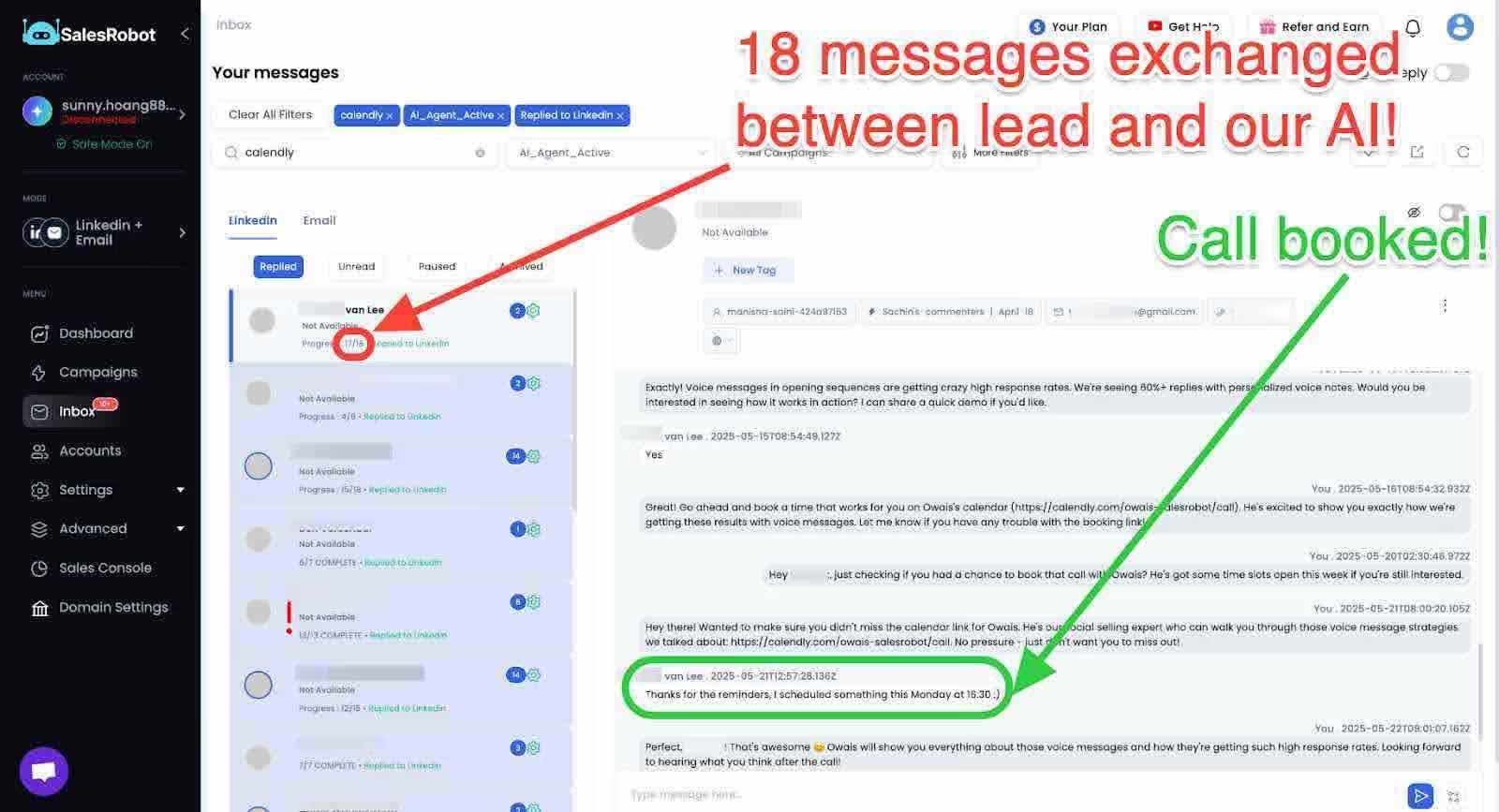
The moment a prospect engages, the automation hands off instead of steamrolling ahead.
Step 7: Set Your Audit Cadence and Trigger Conditions
Schedule the audit so it repeats, because a one-time fix drifts back out of tune within weeks.
There are two triggers to set:
- Time-based: run a full audit at least once a month during active campaigns.
- Event-based: re-run all 7 checks immediately whenever acceptance rate, reply rate, or meetings booked drops more than 20% from a previously stable baseline.
That 20% rule is your early-warning system. Instead of discovering a dead campaign at month's end, you catch the slide while it's still fixable.
Between full audits, you still want eyes on the numbers. The SalesRobot way uses the AI Appointment Setter's Copilot mode: it reviews conversations and suggests personalized replies you approve with one click, keeping performance visible day to day without a full manual pull every time.
How SalesRobot Passes Both Halves of This Audit by Design
Here's the honest reason SalesRobot earns a section in its own audit guide: it's built to clear every check in the framework above without configuration gymnastics.
Run it against the two tracks.
Risk track. SalesRobot uses mobile API technology with residential IP rotation and randomized delays, keeping each account inside human-like limits (up to 200 connection requests per week). It's cloud-based, so there's no browser fingerprint and no shared-IP degradation. Customers report zero account bans on Safe Mode, which directly answers checks #5 and #6.
Performance track. AI Variables personalizes the post-accept DM automatically, the exact lever the 72% reply-lift data points to, and Smart Comments warms prospects before you connect. Checks #1 through #3, handled.
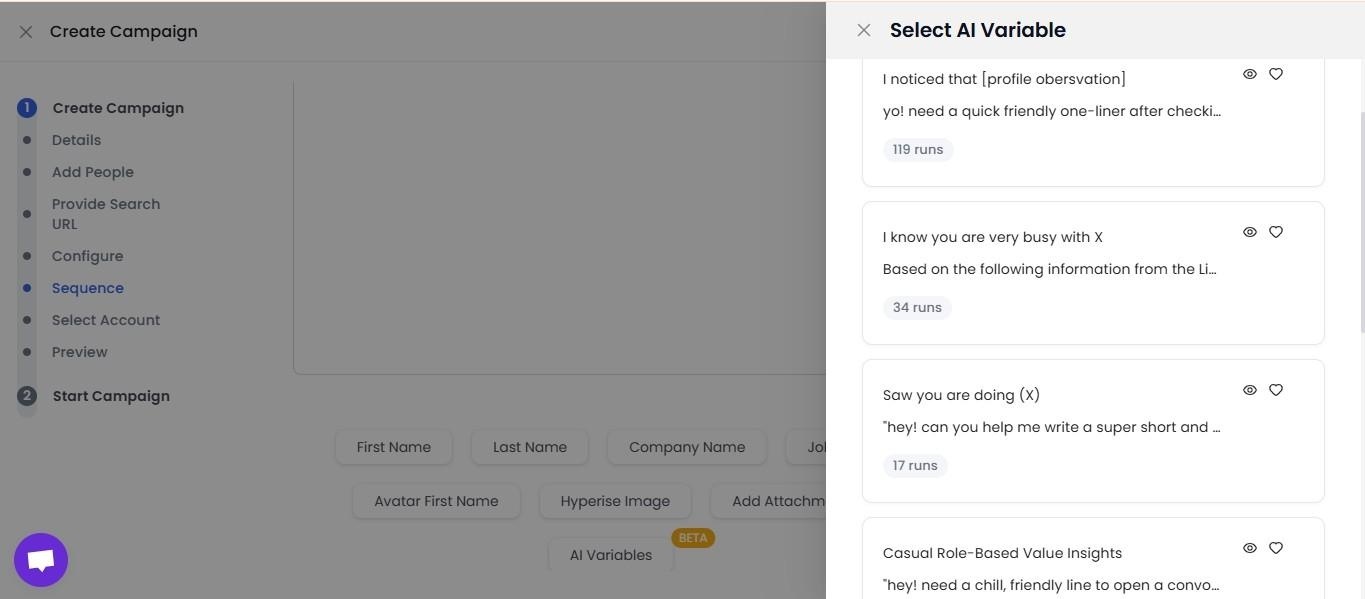
The AI Appointment Setter enforces stop conditions and books meetings 24/7, clearing check #4.
The receipts: a 55% average reply rate across customers, a 51% acceptance rate, and The Growth Agency's 66% reply rate, all above the 2026 benchmarks you measured against in Step 1. SalesRobot is trusted by 4,100+ B2B sales teams and rates 4.8 on G2 from 57+ reviews.
Pricing is flat and simple: Basic at $59/month, Advanced at $79/month, Professional at $99/month, with annual billing saving around 35%.
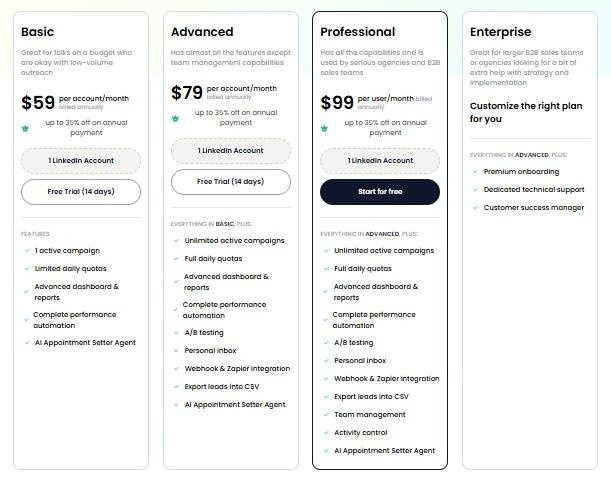
No per-message InMail fees. There's a 14-day free trial, no credit card required.
Common Mistakes That Fail the Audit (Even With a Good Tool)
A reputable tool won't save you from these four. Fix each one directly.
- Never withdrawing old pending invitations. A large backlog of un-accepted invites is a restriction signal LinkedIn explicitly watches for. Fix: withdraw invites still pending after two to three weeks, especially if more than 20% of your sends are hanging.
- Personalizing the note instead of the DM. The note adds essentially nothing to acceptance (26.42% vs 26.37%). Fix: move your best personalization into the message after they accept, where it lifts replies 72%.
- Ignoring the new-account ramp period. Blasting 25 invites a day on a cold account is a fast track to a Tier 1 freeze. Fix: start at 5-10/day for the first two to three weeks, then scale.
- Running all client accounts on one IP. Shared infrastructure gets flagged as an automation service, and one bad account poisons the pool. Fix: use residential IP rotation per account, which is how SalesRobot's Safe Mode is built.
Frequently Asked Questions
Why did my LinkedIn outreach campaign suddenly stop performing?
Run the diagnostic decision tree. If your acceptance rate dropped, it's a targeting or profile problem. If acceptance is healthy but replies fell, your first message is the issue. If replies are strong but meetings dried up, your offer or CTA is the culprit. Pull your last 30 days of data before changing anything.
What are the safe daily limits for LinkedIn connection requests in 2026?
Most professionals stay safe at 15-25 connection requests per day, with a weekly ceiling around 100. New accounts should ramp lower, 5-10 per day for the first two to three weeks. LinkedIn publishes no official number, so these are vendor-consensus estimates, not policy. Low acceptance rates and pending-invite backlogs raise your risk.
Will using LinkedIn automation get my account banned?
It can, if the tool or your usage looks non-human. Extension-based tools and shared-IP infrastructure carry the most risk, and some analyses of automation usage report restriction rates in the low-20% range within 90 days. Cloud-based tools with residential IP rotation and human-like limits, like SalesRobot on Safe Mode, report zero customer bans.
What's the safest type of LinkedIn automation tool to use?
Architecture matters more than brand. Browser extensions carry the highest risk because they leave a detectable fingerprint and run from your own IP. Cloud tools on a shared IP pool are safer but still expose you to one flagged account poisoning the rest. The lowest-risk setup is a cloud tool with residential IP rotation per account and human-like pacing, which is the model SalesRobot's Safe Mode is built on.
What's a good reply rate on LinkedIn?
A good LinkedIn reply rate falls between 10% and 25%, with top performers hitting 30-50% through personalized, multi-touch sequences. The platform-wide average message reply rate is 10.4%. For context, SalesRobot customers average a 55% reply rate, and The Growth Agency reached 66%, both well above benchmark.
Does personalizing LinkedIn connection requests improve acceptance rates?
Barely. Adding a personalized note changes acceptance almost not at all: 26.42% with a note versus 26.37% without. Where personalization actually pays off is the message after acceptance, which lifts the post-accept reply rate 72%, from 5.44% to 9.36%. Personalize the DM, not the connection request.
How often should I audit my LinkedIn automation setup?
Run a full audit at least once a month during active campaigns. On top of that, re-run all your checks immediately whenever acceptance rate, reply rate, or meetings booked drops more than 20% from a previously stable baseline. That 20% trigger catches problems while they're still fixable, instead of at month's end.
Run the Audit Once, Then Make It a Habit
A LinkedIn automation audit isn't a spring-cleaning task. It's a repeating two-track diagnostic. Track one protects your reply rate; track two protects your account. Run all 7 checks monthly, and re-run them the moment a metric drops more than 20%.
The honest reality check: your tool vendor won't flag most of these problems for you. A pending-invite backlog, a note-heavy personalization strategy, a shared IP, these quietly erode your numbers until you go looking. The audit is you going looking.
If you'd rather run a setup that passes both tracks by default, that's the case for SalesRobot. Mobile API with residential IP rotation and Safe Mode handles the risk track. AI Variables and Smart Comments handle the reply-rate track. And the AI Appointment Setter enforces your stop conditions while booking meetings 24/7, which is how customers average a 55% reply rate with zero reported bans.
👉 See it against your own audit: SalesRobot starts at $59/month. Try free for 14 days, no credit card required.

Wow your leads by cloning yourself and sending personalized videos and voice notes to each lead on LinkedIn.
If you don't reply to leads within 5 mins, your chances of converting them fall by 50%. Our AI replies on your behalf instantly! (and yes, you can train it)

Don't shoot in the dark. Get detailed analytics on what's working

SalesRobot allows you to invite other team members, so that they can add their LinkedIn Account, run outreach campaigns and get amazing results just like you.
.avif)


Trusted by 4100+ innovative B2B sales teams and lead gen agencies

.avif)

.avif)




.avif)


Heading 1
Heading 2
Heading 3
Heading 4
Heading 5
Heading 6
Lorem ipsum dolor sit amet, consectetur adipiscing elit, sed do eiusmod tempor incididunt ut labore et dolore magna aliqua. Ut enim ad minim veniam, quis nostrud exercitation ullamco laboris nisi ut aliquip ex ea commodo consequat. Duis aute irure dolor in reprehenderit in voluptate velit esse cillum dolore eu fugiat nulla pariatur.
Block quote
Ordered list
- Item 1
- Item 2
- Item 3
Unordered list
- Item A
- Item B
- Item C
Bold text
Emphasis

Superscript
Subscript