.avif)
TL;DR
- Woodpecker offers solid cold email automation with good deliverability features and inbox rotation.
- The platform includes useful add-ons like LinkedIn outreach and agency management panels.
- Pricing can get expensive quickly when scaling campaigns or adding multiple team members.
- SalesRobot provides a strong alternative with better LinkedIn integration and competitive pricing.
You spend hours crafting the perfect cold email campaign, hit send to your list of 500 prospects, and then... nothing.
Your open rates are pathetic, half your emails bounce, and the few responses you get are unsubscribe requests.
Sound familiar? You're not alone in the cold email struggle.
The problem isn't just writing good emails anymore. It's navigating spam filters, managing multiple sending domains, warming up inboxes, and somehow making it all look effortless and personal at scale.
Woodpecker promises to handle the technical headaches so you can focus on what actually matters: building relationships and closing deals.
In this review, we'll dig into whether it actually delivers on that promise, what it costs, and how it stacks up in 2026's competitive landscape.
We'll also take a look at SalesRobot, a LinkedIn-first outreach tool. Many teams running cold email campaigns eventually need LinkedIn touchpoints in their sequences too, so it's worth knowing what a dedicated LinkedIn automation platform looks like before you commit to either.

Woodpecker: What You Need to Know
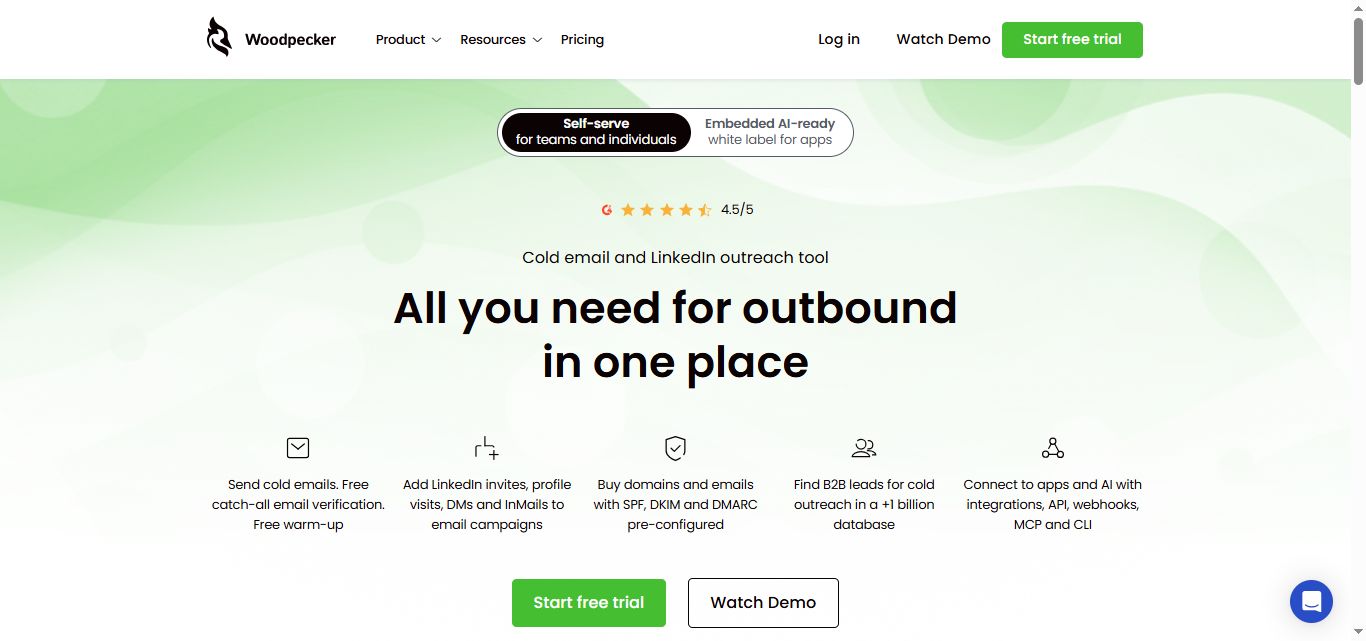
✅ All-in-one cold email powerhouse: Woodpecker bundles everything you need for cold outreach into one platform. You get email verification, warm-up, deliverability monitoring, and even LinkedIn automation all under one roof instead of juggling multiple tools.
⚠️ Learning curve can be steep: With so many features packed in, new users often feel overwhelmed during setup. The interface has tons of options and settings that take time to master, especially if you're new to cold email campaigns.
✅ Free warm-up and verification included: Most competitors charge extra for email warm-up services and verification tools. Woodpecker throws these essential features in for free, which can save you $50-100+ monthly compared to buying separate tools.
✅ Smart deliverability protection: The adaptive sending feature automatically adjusts your email volume to protect your sender reputation. It monitors your domain health and prevents you from hitting spam folders by sending too many emails too fast.
⚠️ Pricing gets expensive quickly: While the base plan looks reasonable, costs pile up fast when you need multiple domains, extra warm-up accounts, or LinkedIn automation. Agencies especially find the add-on costs can double their monthly bills.
✅ LinkedIn integration actually works: Unlike many tools that just claim LinkedIn automation, Woodpecker's integration lets you combine LinkedIn connection requests with email follow-ups seamlessly. You can create multi-channel sequences that feel natural instead of spammy.
⚠️ Limited customization for advanced users: Power users often hit walls when trying to create complex campaign logic or custom workflows. The platform works great for standard campaigns but struggles with unique automation needs that some businesses require.
Woodpecker's Key Features, Broken Down
Free Email Verification & Warm-up
Woodpecker automatically checks your email lists to weed out invalid addresses before you send. This prevents bounces that could hurt your sender reputation.

The platform also includes free warm-up functionality that gradually builds your sender reputation. Think of it like warming up before a workout: your emails slowly ramp up to full sending capacity.
Adaptive Sending Protection
This smart feature monitors your sending patterns to prevent you from hitting spam triggers. It automatically adjusts your sending speed based on your domain's reputation and email provider limits.
For example, if you're using a new Gmail account, it might start with 20 emails per day and gradually increase. No more worrying about accidentally flagging your account for suspicious activity.
Inbox Rotation
Instead of blasting emails from one address, Woodpecker rotates between multiple inboxes automatically. This distributes your sending load and makes your outreach look more natural.
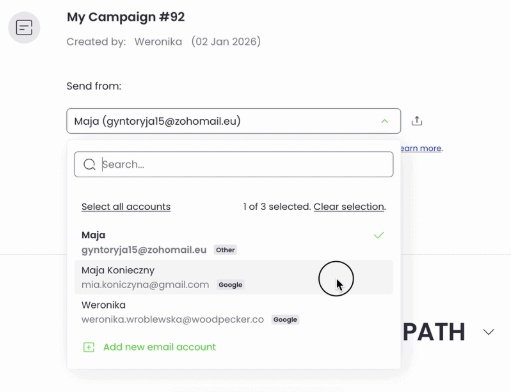
Picture having three team members each send 30 emails instead of one person sending 90. It's the same concept, but automated across your email accounts.
Condition-Based Campaigns
Set up "if this, then that" rules for your email sequences. If someone opens but doesn't reply, send follow-up A. If they click a link, send follow-up B instead.
This means a prospect who downloads your case study gets a different follow-up than someone who just read your email. It's personalization without the manual work.
LinkedIn Integration
Combine email outreach with LinkedIn touchpoints in the same campaign sequence. Send an email on day 1, a LinkedIn connection request on day 3, then another email on day 7.
This multi-channel approach increases your chances of getting noticed. Some prospects ignore emails but always check LinkedIn, and vice versa.
Centralized Inbox & Agency Panel
All replies from your various email accounts flow into one unified inbox. No more checking five different Gmail accounts to see who responded.
The agency panel lets you manage multiple client campaigns separately while keeping everything organized. Perfect for agencies juggling outreach for different companies without mixing up conversations.
Woodpecker Pricing: How Much Will It Cost?
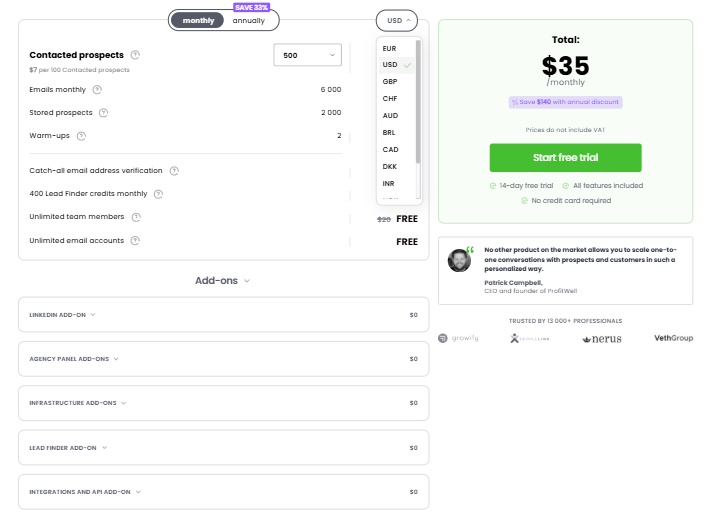
Woodpecker publishes its pricing publicly with a usage-based model built around the number of contacted prospects. Here's how it breaks down:
Free Trial: $0
- 14-day trial period with all features unlocked
- No credit card required to start
- Full access to cold email tools, verification, and warm-up features
- Trial time can be extended through the app
This trial is perfect for anyone wanting to test Woodpecker's full capabilities before committing. You get complete access to evaluate if the platform fits your cold email needs.
Base Plan: Starts at $35/month
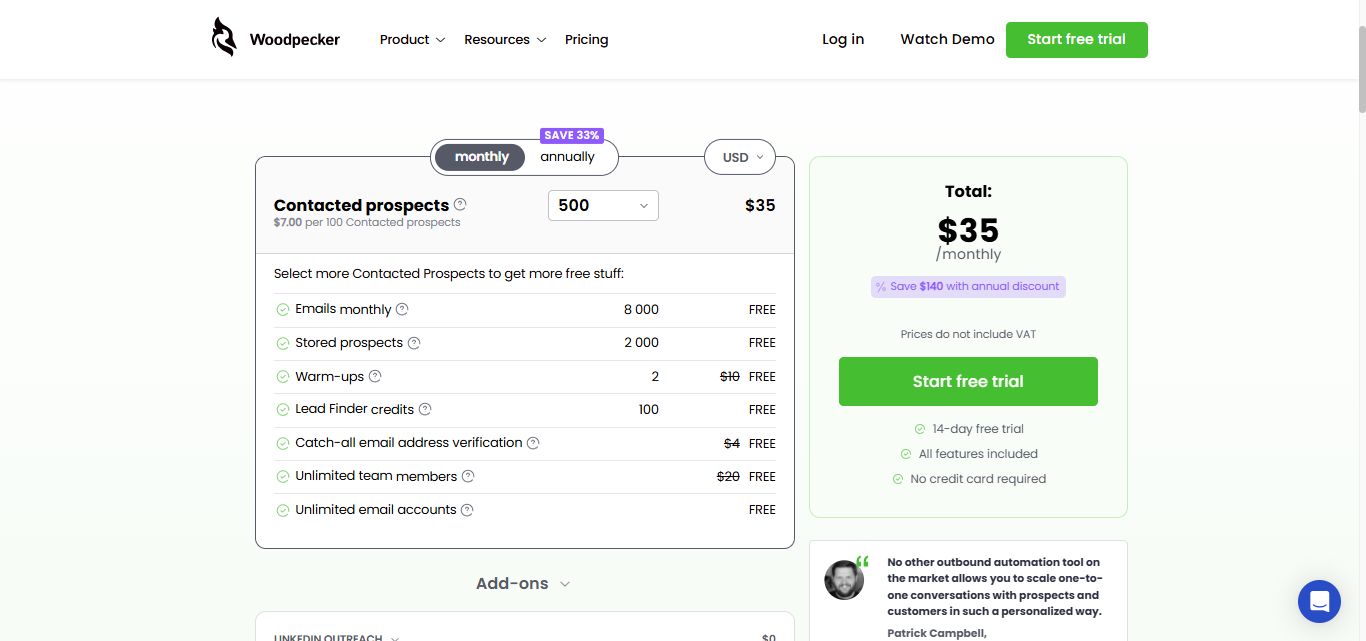
- 500 contacted prospects per month ($7 per 100 contacted prospects)
- 6,000 emails per month
- 2,000 stored prospects
- 2 warm-up accounts (free)
- Catch-all email address verification (free)
- 400 Lead Finder credits per month (free)
- Unlimited team members (free)
- Unlimited email accounts (free)
The plan scales in price as you increase your contacted prospects. At $7 per 100 prospects, a campaign reaching 2,000 people per month would put you at $105/month before add-ons.
Key Features Included:
- Free email verification to avoid bounces
- Automatic warm-up to build sender reputation
- Inbox rotation and adaptive sending
- Centralized inbox management
- Domain audit tools
- GDPR compliant operations
- Condition-based campaign automation
The platform includes deliverability features that many competitors charge extra for. For lower-volume campaigns, this bundling provides solid value. At higher volumes, the per-prospect pricing adds up quickly.
Available Add-ons:
- LinkedIn outreach automation
- Agency management panel for client campaigns
- Infrastructure add-ons
- Additional Lead Finder credits
- Integrations and API access
These add-ons are priced separately, which means your actual monthly bill can grow significantly beyond the base plan if you need LinkedIn automation or agency panel access.
The modular approach lets you pay only for features you actually need, but agencies in particular should run through the full add-on costs before signing up.
Woodpecker vs SalesRobot: How Do They Compare?
Choose Woodpecker if email outreach is your primary channel and you need advanced deliverability features.
Pick SalesRobot if LinkedIn prospecting drives your sales process and you want native social selling automation.
SalesRobot: The LinkedIn-First Alternative

If you've been weighing Woodpecker for your outreach, consider this: your best prospects are probably hanging out on LinkedIn, not just checking email.
SalesRobot takes a different approach by putting LinkedIn at the center of your lead generation strategy, where decision-makers actually spend their time engaging professionally.
What SalesRobot Actually Does
SalesRobot is a cloud-based automation platform built specifically for LinkedIn outreach, with email as a supporting channel.
It's designed for B2B sales teams and agencies who want to reach prospects where they're most active and engaged, using LinkedIn's native messaging combined with follow-up email sequences.
Key Features
- LinkedIn Connection Sequences: Automates connection requests, follow-up messages, and InMails with smart reply detection that stops messaging when prospects respond. This prevents the awkward over-messaging that kills conversations.
- AI-Powered Voice & Video Messages: Send personalized voice notes and video messages directly through LinkedIn at scale. Users report 40%+ higher reply rates because these feel genuinely personal in a sea of text-based outreach.
- Mobile API Safety: Uses LinkedIn's mobile app APIs instead of browser automation, which dramatically reduces account ban risk. This is crucial since losing your LinkedIn account means losing years of connections and credibility.
- Multi-Channel Sequences: Combines LinkedIn messages with email follow-ups in unified campaigns. You can start with a LinkedIn connection, follow up with InMail, then switch to email for prospects who don't respond.
- Smart Daily Limits: Automatically manages LinkedIn's daily quotas (75 connection requests, 75 messages) with human-like timing patterns. No more manually tracking limits or risking account restrictions.
- AI Appointment Setter: An optional add-on appointment setter agent that manages your inbox responses and nurtures leads until they're ready to book meetings. It handles the back-and-forth conversations so your team doesn't have to.
SalesRobot Pricing
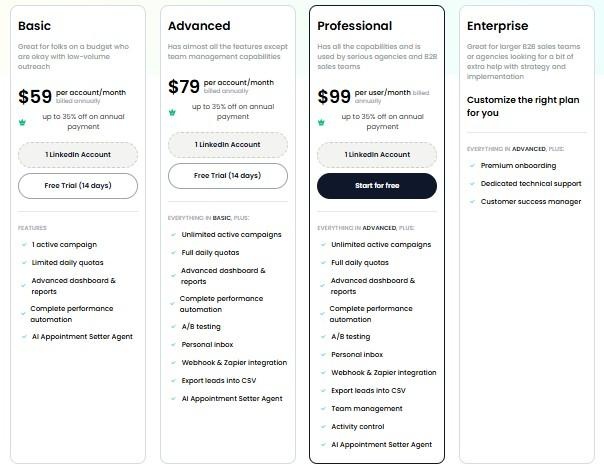
SalesRobot charges per LinkedIn account connected, with different feature tiers based on your automation needs.
Basic: $39/month per LinkedIn account
- 1 active campaign
- Limited daily quotas (20 connections, 20 messages daily)
- Basic analytics and reporting
Good for small teams testing LinkedIn outreach on a budget.
Advanced: $59/month per LinkedIn account
- Unlimited active campaigns
- Full daily quotas (75 connections, 75 messages)
- A/B testing and webhook integrations
- Unified inbox for managing responses
The sweet spot for most sales teams who want full LinkedIn automation capabilities.
Professional: $79/month per LinkedIn account
- Everything in Advanced
- Team management and activity control
- Advanced analytics dashboard
- Lead export to CSV
Built for agencies and larger sales teams managing multiple accounts.
Enterprise: Custom pricing
- All Professional features
- Dedicated customer success manager
- Premium onboarding and technical support
For large organizations needing hands-on support and custom implementation.
SalesRobot offers a 14-day free trial with no credit card required, giving you plenty of time to test their LinkedIn automation and see if your prospects respond better on the platform where they're already engaged professionally.
The Verdict
Woodpecker is a solid email outreach tool that does what it promises. The deliverability features work well, and the interface won't make you want to throw your laptop out the window.
But here's the thing: email open rates keep dropping, and buyers are spending more time on LinkedIn than in their inboxes. Woodpecker feels like betting on yesterday's game.
The pricing is fair for what you get, but you're paying for email-only when most successful outreach today requires multiple channels.
Bottom Line
Buy Woodpecker if you're running pure email campaigns and your audience actually opens emails.
Skip it if you need LinkedIn outreach, want true multichannel sequences, or you're targeting B2B prospects under 40.
If LinkedIn is where your prospects hang out, check out SalesRobot instead. It's built for LinkedIn-first outreach with email as backup, which honestly makes more sense in 2026.

Frequently Asked Questions
Does Woodpecker have a free trial?
Yes. Woodpecker offers a free trial that lasts 14 days or 100 cold emails, whichever comes first. No credit card is required to start, you get access to all core features, and you can request an extension through the in-app support chat if you need more time.
How much does Woodpecker cost per month?
Woodpecker's base Cold Email plan starts at $35/month for 500 contacted prospects, priced at $7 per 100 contacted prospects. Costs scale with prospect volume, and add-ons like LinkedIn automation ($29/month per account) or the agency panel are billed on top of the base subscription.
Is using LinkedIn automation tools safe for my account?
It depends on the technology used. Traditional browser extensions can trigger LinkedIn’s anti-spam algorithms and risk account restriction. SalesRobot uses cloud-based mobile app APIs and residential IP rotation rather than browser extensions, reducing ban risk to ~0.00001% while staying within safe daily limits (up to 75 connection requests and 50 InMails per day).
Can agencies manage multiple client campaigns on Woodpecker or SalesRobot?
Yes, both tools support multi-client setups. Woodpecker offers a dedicated Agency Management Panel as a paid add-on ($27/active client) to keep campaigns separated. SalesRobot allows you to connect multiple LinkedIn accounts and offers team management and activity control on its Professional and Enterprise plans.
Which tool is better for cold outreach: Woodpecker or SalesRobot?
Choose Woodpecker if your target audience heavily relies on cold email and you need advanced deliverability features like adaptive sending, inbox rotation, and free email verification. Choose SalesRobot if your ideal prospects are active on LinkedIn and you want to leverage personalized AI voice notes, video messages, and multichannel sequences.
Does Woodpecker charge extra for email warm-up and verification?
No. Unlike many competitors, Woodpecker includes free email verification (catch-all powered by Bouncer) and free warm-up functionality (for 2 accounts) directly within its base plan starting at $35/month.

Wow your leads by cloning yourself and sending personalized videos and voice notes to each lead on LinkedIn.
If you don't reply to leads within 5 mins, your chances of converting them fall by 50%. Our AI replies on your behalf instantly! (and yes, you can train it)

Don't shoot in the dark. Get detailed analytics on what's working

SalesRobot allows you to invite other team members, so that they can add their LinkedIn Account, run outreach campaigns and get amazing results just like you.
.avif)


Trusted by 4100+ innovative B2B sales teams and lead gen agencies

.avif)

.avif)




.avif)


Heading 1
Heading 2
Heading 3
Heading 4
Heading 5
Heading 6
Lorem ipsum dolor sit amet, consectetur adipiscing elit, sed do eiusmod tempor incididunt ut labore et dolore magna aliqua. Ut enim ad minim veniam, quis nostrud exercitation ullamco laboris nisi ut aliquip ex ea commodo consequat. Duis aute irure dolor in reprehenderit in voluptate velit esse cillum dolore eu fugiat nulla pariatur.
Block quote
Ordered list
- Item 1
- Item 2
- Item 3
Unordered list
- Item A
- Item B
- Item C
Bold text
Emphasis

Superscript
Subscript