.avif)
TL;DR
- LinkedIn-First GTM flips the old order. You run LinkedIn connection and engagement touches before cold email, so the inbox is already warm when your email actually lands.
- The math forced the switch. Cold email reply rates fell from 8.5% in 2019 to 3.43% in 2026 (Instantly benchmark), while LinkedIn DMs hold at 10.3% and InMail runs 10-25%.
- Personalization compounds it. Personalized connection requests hit ~45% acceptance vs ~15% for generic ones, a 3x gap.
- The proven cadence is five touches across two channels: LinkedIn request day 0, email day 2, email day 5, LinkedIn DM day 8, break-up email day 12.
- Multichannel beats single-channel. The two-channel version of a sequence drives 2-3x more positive replies than email-only.
- Mind the guardrails. LinkedIn's 2026 limits are dynamic (roughly 50 to 200 requests a week), and an acceptance rate below 20% can trigger throttling.
- Pick your starting point by situation. LinkedIn-first for high-value, specific ICPs and long deal cycles; email-first with a LinkedIn warm-up layer when you're pushing 5,000+ contacts a month at SMB velocity.
- SalesRobot runs the whole sequence in one platform at a 51% connection acceptance rate vs the 28.5% platform average, auto-switching from LinkedIn to email with unified attribution.
👉 Skip the two-tool mess: SalesRobot starts your sequence on LinkedIn and auto-switches to email if there's no reply, with unified attribution so you know which touch won the meeting. Try free for 14 days.
Is Your Outreach Strategy Running on 2019 Math?
Your reply rate chart looks like a ski slope, and not the fun kind.
You send more emails than ever, and fewer land. Meanwhile that one LinkedIn message you fired off between meetings? Booked a call.
Here's the uncomfortable part. Most outbound playbooks still say "email first, LinkedIn as backup." That advice was written when cold email replied at 8.5%. In 2026 that number is 3.43%.
So teams are quietly reversing the order: LinkedIn first, email second. Not because it's trendy, but because the numbers force it.
This guide breaks down what LinkedIn-First GTM actually means, the 2026 data behind the shift, the exact cadence that works, LinkedIn's current sending limits, and how to decide which starting point fits your situation.
What "LinkedIn-First GTM" Actually Means (And What It Doesn't)
LinkedIn-First GTM is a go-to-market sequencing strategy where LinkedIn connection and engagement touchpoints come before cold email, using familiarity and trust signals to lift email open and reply rates downstream. It's about the order of your touches, not choosing one channel forever.
LinkedIn-first does not mean "only LinkedIn."
It means LinkedIn is the warm-up layer. A profile view, a connection request, maybe a thoughtful comment on a post. These are small signals that make your name familiar before your email ever hits their inbox.
Why does that work? Because people trust familiar names more than strangers. When your cold email arrives after the prospect has already seen and accepted you on LinkedIn, it reads as a follow-up, not an intrusion.
Cold email still scales further on raw volume, and that's real. But LinkedIn wins on connection quality, and the connection is what makes the email land.
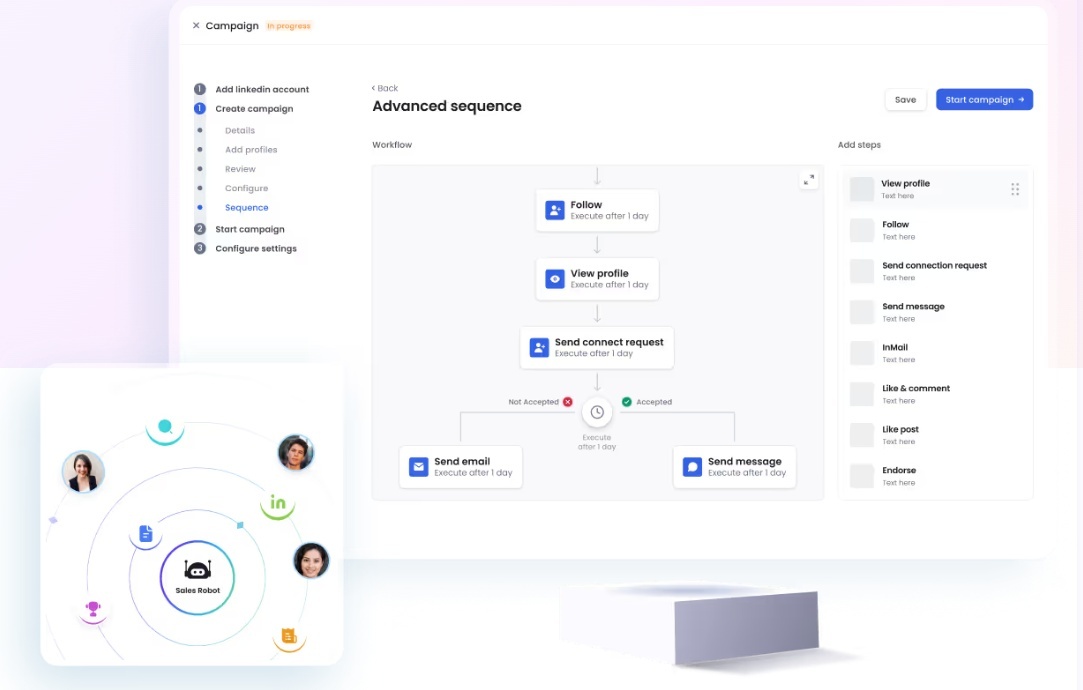
In practice, the two channels aren't rivals. The whole point of a tool like SalesRobot is that it starts the drip on LinkedIn (connection request → message → follow-up) and automatically switches to email if the prospect doesn't respond.

One sequence, both channels, in order.
The Math That Made B2B Teams Switch: 2026 Reply Rate Reality Check
The case for LinkedIn-first isn't a vibe. It's arithmetic, and here's the arithmetic.
Read that table again. Cold email reply rates dropped by more than half in six years, while LinkedIn DMs still return roughly 3x the reply rate of email.
And personalization compounds it. Personalized requests hit ~45% acceptance versus ~15% for generic ones, a 3x difference.
Now run the funnel. Send 100 weekly invites at a 40-60% signal-based acceptance rate and you get 40-60 connections. At a 25-45% reply rate, that's 10-27 conversations per 100 invites, versus 1-3 demos per 100 cold email sends.
That's a 10-27x edge, and it's why the shift is happening. For reference, SalesRobot customers run a 51% connection acceptance rate and a 55% average reply rate, both well above the 28.5% platform average and the 3.43% email floor.
The LinkedIn-First Warm-Up Sequence: A Named Framework for 2026
Here's the cadence that consistently outperforms either channel alone. Call it the LinkedIn-First Warm-Up Sequence.
The day-0 connection request carries no pitch. Its only job is to plant your name.
By day 2, when your first email arrives, you're a familiar face, not a stranger. That familiarity is exactly what lifts open and reply rates.
Why five touches across two channels? Because most prospects need 5-7 touches before they engage, and when those touches arrive across different channels instead of hammering one inbox, reply rates jump.
The payoff is measurable. This two-channel structure typically drives 2-3x more positive replies than an email-only sequence at the same contact volume.
https://www.youtube.com/watch?v=ImKHuHMvYC0
Running this by hand is tedious. You're tracking who accepted, who to email, who to DM, all across two tools. SalesRobot runs the entire sequence as one drip: it starts on LinkedIn, and if the prospect doesn't respond there, it automatically switches to email.
LinkedIn's 2026 Sending Limits: What You Can Actually Send Per Week
Before you scale this, know the guardrails. LinkedIn's 2026 sending limits are dynamic, not fixed, and LinkedIn doesn't publish exact numbers officially, so treat these as widely reported ranges rather than hard rules.
Here's where they land as of 2026:
- Around 80 to 100 connection requests per week for standard accounts.
- Up to roughly 200 per week for high-trust, aged accounts.
- As low as 50 per week if your account gets flagged.
And there's a hidden trigger most people miss: an acceptance rate below 20% tends to trigger account throttling. Spray generic requests and LinkedIn quietly throttles you.
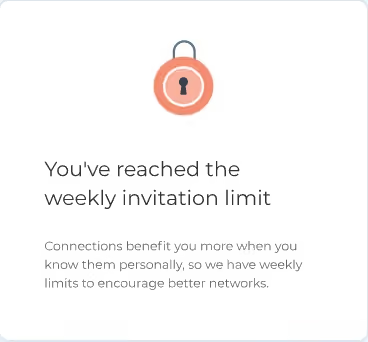
That's why targeting quality, not volume, is the real constraint here. The cap isn't your bottleneck; your list is.
In practice, 100 weekly invites to the right people beats 500 spray-and-pray requests that tank your acceptance rate and get you throttled. C-suite prospects are the hardest to reach in any vertical, accepting at just 18-25%, so precision matters most at the top.
This is where account safety becomes non-negotiable. It's also where the tool you pick matters.
Browser-extension tools like Dux-Soup and Waalaxy run through your own browser session and share your local IP, which raises the detection footprint when you scale.

SalesRobot takes the opposite approach. It's cloud-based and uses mobile API technology that mimics human behavior, with randomized delays, human-like daily limits (up to roughly 200 requests a week), and residential IP rotation. Customers report zero account bans when following its Safe Mode guidelines.
LinkedIn-First vs. Email-First: Which Starting Point Fits Your Situation?
Not everyone should lead with LinkedIn. Here's an honest decision matrix instead of a lazy "use both."
The core question is always this: where does your ICP actually live, and do you need speed or trust?
Email gives you faster scale. LinkedIn gives you higher familiarity. If your deals are big and your list is specific, trust wins, so go LinkedIn-first.
If you're an agency, LinkedIn-first with a multi-account stack is the standard play.

SalesRobot's team management dashboard runs campaigns across 50-100+ LinkedIn accounts from one login, each with its own sending limits and inbox. That means you scale sender volume without juggling a dozen browser tabs or risking one flagged account taking down the rest.
How SalesRobot Runs the LinkedIn-First Sequence in One Platform
Here's the number one reason LinkedIn-first fails in practice: teams run LinkedIn in one tool and email in another, and then have no idea which touch actually drove the meeting.
Split attribution kills your ability to optimize. You can't double down on what you can't measure.
SalesRobot fixes this by running the whole sequence in one platform. Three capabilities matter most for LinkedIn-first GTM.
1. The multi-channel drip. SalesRobot creates campaigns that start on LinkedIn (connection request → message → follow-up) and then automatically switch to email if the prospect doesn't respond on LinkedIn. That's the exact LinkedIn-First Warm-Up Sequence, automated, with unified reply attribution built in.

Because both channels live in one campaign, you see which touch (the LinkedIn DM or the day-5 email) actually opened the conversation, so you can optimize the cadence instead of guessing.
2. AI Variables personalization. SalesRobot's AI Variables feature enriches each prospect with data pulled from their LinkedIn profile, things like recent job changes, company news, and shared connections, then personalizes each connection request automatically.
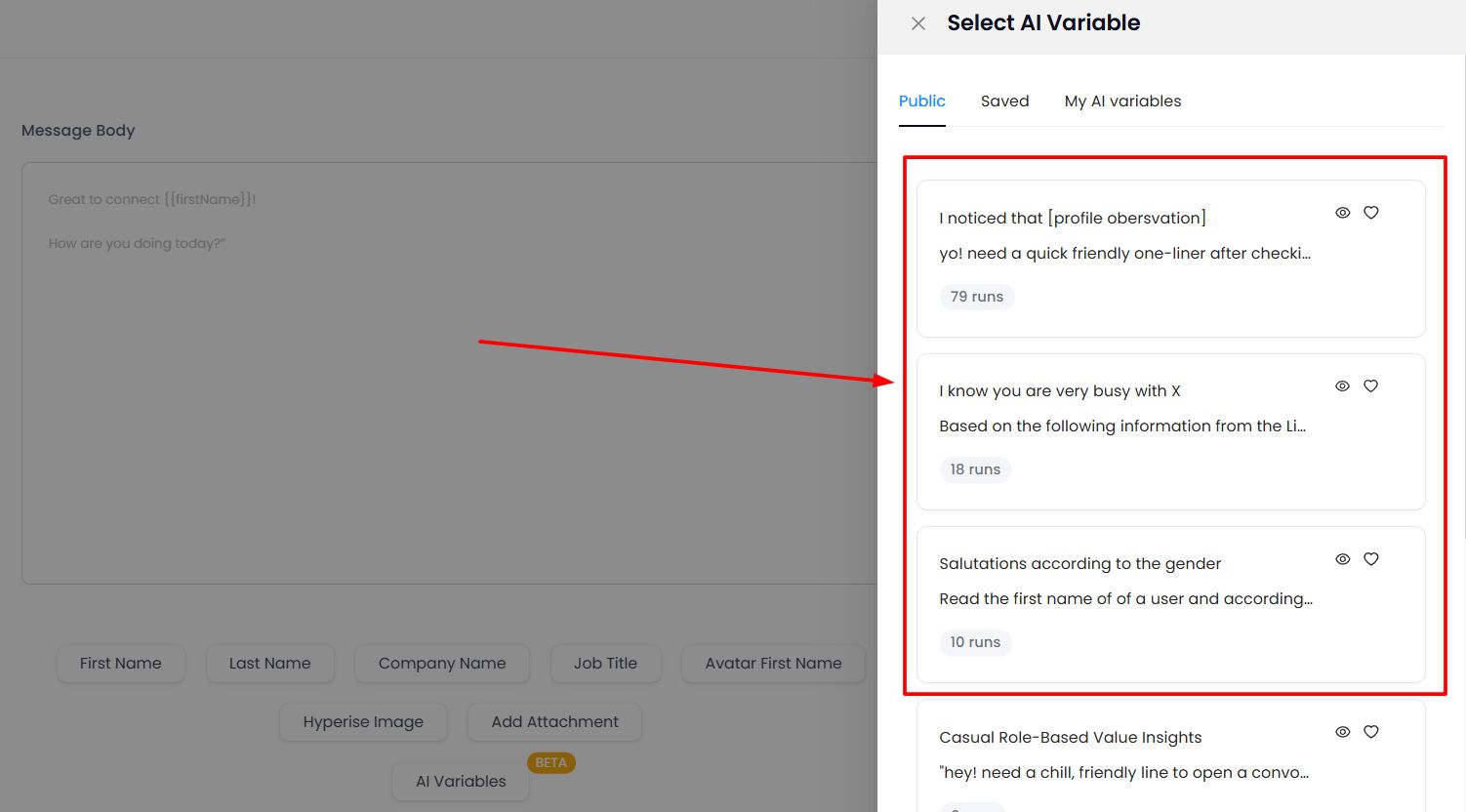
Instead of hand-writing 100 openers, you write the logic once and every request goes out tailored. That's what pushes acceptance toward the ~45% personalized rate instead of the ~15% generic one.
3. Safe execution at the cap. SalesRobot's mobile API stays within LinkedIn's dynamic weekly limits using residential IP rotation and human-like pacing, so you're not hammering the platform from a single flagged IP.
Customers report zero account bans on Safe Mode, which means you scale sender volume without tripping the sub-20% acceptance throttle that quietly caps most manual senders.
The proof is in the customer numbers: a 51% connection acceptance rate (vs the 28.5% platform average), a 55% average reply rate, and a 66% reply rate at The Growth Agency. Trusted by 4,100+ B2B sales teams, rated 4.8 on G2 from 57+ reviews.

Pricing starts at $59/month on the Basic plan, with annual billing saving around 35%. There's a 14-day free trial, no credit card required.
Frequently Asked Questions
Should I send LinkedIn or email first in a B2B sequence?
Lead with LinkedIn if you're targeting roughly 200 or fewer specific contacts per week. The familiarity signal from a connection request lifts your email open rates downstream. If you're pushing 5,000+ contacts a month at SMB velocity, email-first with a LinkedIn follow-up layer is operationally more realistic.
Which is better for B2B prospecting: LinkedIn or cold email?
For reply rate, LinkedIn wins: DMs return 10.3% versus cold email's 3.43% in 2026. For raw volume, email scales further. The highest-performing teams don't pick one. They run both in a coordinated sequence, using LinkedIn to warm prospects before email fires, driving 2-3x more replies than either alone.
What is a good LinkedIn connection acceptance rate in 2026?
The 2026 platform-wide average is 28.5%, based on 13.2 million tracked requests (Expandi). A strong rate sits between 30% and 45%. Personalized requests hit around 45% versus 15% for generic ones. Anything below 20% tends to trigger LinkedIn account throttling, so prioritize targeting quality over volume.
When should you use LinkedIn InMail as your primary outreach channel?
Prioritize InMail when you can't connect first: targeting 2nd or 3rd-degree prospects outside your network, or executives unlikely to accept a cold request. InMail response rates run 10-25%, but it costs roughly $2-8 per send. Connection-request-first sequences cost nothing per message, so most teams try connecting before paying for InMail.
How many LinkedIn connection requests can you send per week in 2026?
LinkedIn's 2026 limits are dynamic and not officially published, but they're widely reported at around 80 to 100 requests per week for standard accounts, up to roughly 200 for high-trust aged accounts, and as low as 50 for flagged accounts. Acceptance rate matters more than the cap. A rate below 20% throttles your account, so targeting quality determines your real ceiling.
Is LinkedIn automation safe for my account in 2026?
It can be, if the tool respects LinkedIn's behavior signals. The riskiest setups are browser extensions that run from your local IP and fire actions at machine speed.
Cloud tools that use mobile-app APIs, randomized human-like delays, and residential IP rotation stay far closer to normal usage. SalesRobot runs on that safer model, and customers report zero account bans on Safe Mode.
Either way, keeping your acceptance rate above 20% and your daily volume human-like is what actually protects the account.
Does LinkedIn outreach still work in 2026 or is it getting too crowded?
Yes. LinkedIn DMs hold a 10.3% reply rate versus cold email's 3.43% floor in 2026. It's more competitive than it was in 2021, but warm, personalized, signal-triggered sequences consistently beat generic blasts on any channel. Most decision-makers ignore generic cold DMs, while warm, relevant outreach converts at several times the rate.
Where to Start If You're Flipping to LinkedIn-First Today
The takeaway is simple. In 2026, leading with LinkedIn warms the inbox that cold email can no longer open on its own.
If you're switching today, make three moves. First, audit your ICP: are they actually active on LinkedIn? Second, cap your weekly invites around 100 and pour your energy into personalization, not volume. Third, set up the 12-day cross-channel cadence inside one tool so your attribution stays clean.
One honest reality check: LinkedIn-first won't rescue a bad ICP or weak messaging. It's a sequencing advantage, not a silver bullet. The message still has to be worth reading.
When you're ready to run it without babysitting two tabs, SalesRobot runs the full LinkedIn-then-email sequence in one platform. AI-personalized requests hit a 51% acceptance rate and a 55% average reply rate, with mobile-API safety that keeps accounts ban-free.
Plans start at $59/month, annual billing saves around 35%, and there's a 14-day free trial with no credit card required. Start here.

Wow your leads by cloning yourself and sending personalized videos and voice notes to each lead on LinkedIn.
If you don't reply to leads within 5 mins, your chances of converting them fall by 50%. Our AI replies on your behalf instantly! (and yes, you can train it)

Don't shoot in the dark. Get detailed analytics on what's working

SalesRobot allows you to invite other team members, so that they can add their LinkedIn Account, run outreach campaigns and get amazing results just like you.
.avif)


Trusted by 4100+ innovative B2B sales teams and lead gen agencies

.avif)

.avif)




.avif)


Heading 1
Heading 2
Heading 3
Heading 4
Heading 5
Heading 6
Lorem ipsum dolor sit amet, consectetur adipiscing elit, sed do eiusmod tempor incididunt ut labore et dolore magna aliqua. Ut enim ad minim veniam, quis nostrud exercitation ullamco laboris nisi ut aliquip ex ea commodo consequat. Duis aute irure dolor in reprehenderit in voluptate velit esse cillum dolore eu fugiat nulla pariatur.
Block quote
Ordered list
- Item 1
- Item 2
- Item 3
Unordered list
- Item A
- Item B
- Item C
Bold text
Emphasis

Superscript
Subscript