.avif)
TL;DR
TexAu is a cloud automation platform for lead generation across LinkedIn, Twitter/X, Instagram, TikTok, YouTube, and 50+ other web sources.
TexAu has moved from time-based pricing to a credit-based model with four plans: Solo ($99/mo), Starter ($249/mo), Teams ($649/mo), and Enterprise (custom).
Users like TexAu's wide automation library, multi-platform reach, and CRM integrations via Zapier and Make.
Users dislike TexAu's support, UI bugs, confusing proxy setup, and steep learning curve.
SalesRobot comes out as the top TexAu alternative, with stronger LinkedIn-specific prospecting, built-in account safety, and AI-personalized voice and video outreach at scale.
Are you looking to use TexAu to take your lead generation efforts to new heights?
If so, you've come to the right place.
In this TexAu review, we'll dive deep into the tool and explore whether it can help your lead generation strategy.
We understand that investing in new tools can be daunting, especially when unsure about the potential return on investment.
That's why this review will provide all the necessary insights to help you make an informed choice.
Throughout this blog, we'll discuss:
✅ What are the pros and cons of using TexAu?
✅ We'll find out if the tool is budget-friendly
✅ And explore a viable alternative in the market.
We'll also explore whether an automation tool for lead generation is the right fit for your business or if a sales outreach tool might better suit your needs.
By the end of this review, you'll have a good understanding of TexAu, its pricing structure, and the benefits it can bring to your lead-generation efforts.
You won't have to second-guess your decision anymore; we've got you covered.

So, what is TexAu?
TexAu is a cloud automation platform that helps businesses generate leads. They claim to get you leads from anywhere.
It automates repetitive tasks and allows users to engage with prospects on platforms like LinkedIn, Instagram, Youtube, TikTok, X(Formerly Twitter), and over 50 other web sources.
With TexAu, businesses can save time, be more productive, and achieve better results in their lead-generation efforts through pre-built scrapers, AI-powered personalization, and multi-channel outreach sequences.
TexAu has also repositioned itself as a managed GTM (go-to-market) platform built around lead search, enrichment, verification, AI lead scoring, and CRM sync with lead search bundled into the same credit pool as enrichment across every plan.
But how does it exactly do this? Time to find out…
Pros and Cons of using TexAu
If you are short on time, here's a quick overview of the pros and cons of TexAu:

Got time for us? If yes, then let's start our detailed review of TexAu.
TexAu Review
First off, we'll review the good, the bad, and the ugly of TexAu.
Then, we will determine if the tool is a good value for its price.
And then other important features in the following sections.
TexAu's Advantages: 5 User-Identified Pros to Consider
Here is a list of the advantages of using TexAu-
1. Social Media Automation:
- The tool can automate tasks on over 50 social media platforms and web sources, including LinkedIn and Twitter.
- The tool provides +180 no code automation ready to use. It helps reach more people and save time.
.jpeg)
2. Workflows and Data Pipelines:
- The tool allows you to create seamless automation sequences with ease.
- You can combine multiple tools into efficient workflows.
- You can integrate with CRMs, email services, and tools like Webhooks triggers, Zapier, and Make, making it a versatile solution for teams looking to automate their marketing and sales processes.
.jpeg)
3. Verified Inbox:
- The tool now lets you find verified emails, which means no more high bounce rates.
- Always land in the primary inbox.

4. Ability to Connect Multiple Platforms:
- You can integrate and automate tasks across 1000's of other apps via Zapier and Make.
- Streamline workflows and consolidate automation efforts.

5. Data Extraction and Automation:
- Extract, process, and filter data and automate data-related tasks.
- Leverage data processing for growth and automation.
.jpeg)
TexAu empowers businesses to automate tasks, save time, and maximize growth potential through its cloud-based and desktop versions that ensure continuous automation.
But like any other tool, TexAu also has some not-so-great features.
So, let's jump right into the cons and weigh them against the pros we just discussed.
TexAu's Disadvantages: User Identified Cons to Consider
Based on the reviews, let's dive into the 5 biggest drawbacks of TexAu:
1. Subpar Support and Confusing Proxy Setup:
- Their Lackluster customer support is useless for a product with a high price tag.
- Setting up proxies through a third party is confusing and prone to bugs.
.jpeg)

2. Time-based Pricing and Limited Server Power:
- Note: TexAu has since moved away from time-based pricing to a credit-based model where credits roll over month-to-month (up to 2x your balance), so this older complaint about exhausting monthly hours no longer applies.
- Limited server resources lead to slower processing, requiring more time for the same tasks.
.jpeg)
3. User Interface and Bugs:
- Non-intuitive user interface that takes time to navigate.
- Some small bugs persist, requiring occasional troubleshooting.
.jpeg)
4. Unreliable Functions and Constant Monitoring:
- You need to babysit automations to ensure they're functioning properly and negate the time-saving aspect of the platform.
- Obscurely named and disorganized automations make it challenging to get the desired results.
.jpeg)
5. Steep Learning Curve and Outdated Guides and Tutorials:
- They have insufficient guides, which makes it difficult for beginners to grasp the software.
- The learning curve is steep as they have no proper documentation.

What are TexAu pricing plans?
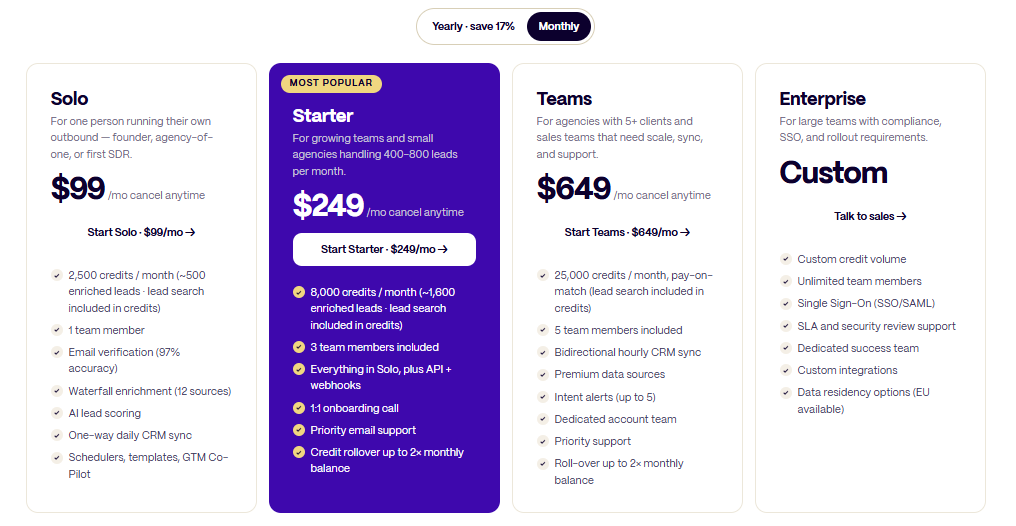
TexAu offers 4 different plans:
Solo $99/mo
- For solo founders or first SDR
- 2,500 credits/mo (~500 leads)
- 1 team member
- Email verification, AI lead scoring
- Daily CRM sync
Starter $249/mo (Most Popular)
- For growing teams/small agencies
- 8,000 credits/mo (~1,600 leads)
- 3 team members
- API + webhooks, onboarding call
- Priority support, credit rollover 2x
Teams $649/mo
- For agencies with 5+ clients
- 25,000 credits/mo, pay-on-match
- 5 team members
- Hourly CRM sync, intent alerts
- Dedicated account team
Enterprise Custom
- For large teams needing compliance
- Unlimited members, SSO/SAML
- Custom integrations
- EU data residency available
All plans are cancel anytime, yearly billing saves 17%.
Now that we have explored the pricing plans of TexAu, let's review other features and functionalities that come with each package.
What are TexAu's Additional Features?
The following is the list of other notable features of the tool:
- Desktop App: TexAu offers a desktop application that enables you to access and run automation directly from your computer, providing convenience and ease of use.
- CRM enrichment: TexAu allows you to extract and enrich data from LinkedIn profiles, company pages, and websites, providing valuable information for enriching your CRM.
.jpeg)
- Social media marketing: TexAu offers automation for social media platforms like Twitter, Pinterest, and Medium, helping you automate tasks such as liking, following, scraping profiles, and extracting data.
- Google-related automation: TexAu provides automation for Google, including scraping search results, extracting reviews from Google Maps, and scraping trends, helping you gather data and insights for your business.
.jpeg)
- Website-related automation: TexAu offers various website-related automation, such as extracting data from websites, taking screenshots, finding company pages on Crunchbase, and extracting social media links.
Let me explain why a proper lead generation and prospecting alternative is so important:
Automation tools can help streamline the lead generation process, saving you time and effort.
But they often lack the specificity and customization needed for effective lead generation.
Think about it this way:
If you were building a house, would you rely on a general contractor who claims to do it all, or would you hire specialized experts for each aspect of the construction?
The same principle applies to lead generation.
A proper lead generation tool knows the ins and outs of LinkedIn outreach, cold outreach, etc. (LinkedIn is the most effective platform for lead generation, more than any other social media platform).
It understands the algorithms, best practices, and techniques to maximize your results.
It offers good search filters and criteria, allowing you to pinpoint your ideal prospects with precision.
No more sifting through irrelevant profiles!
A dedicated lead generation tool will &nb
It's like having a personal assistant who knows exactly who you should be talking to.
So, having delved into the array of features TexAu brings to the table, we will now explore a TexAu alternative.
But we must first identify the concerns we need to address with SalesRobot. By understanding these key points, we'll be better equipped to assess its suitability:
- Reliability issues and occasional bugs
- Limited user interface intuitiveness
- Learning curve for beginners
- Lack of comprehensive use case documentation
- Terrible Support
- Pricing structure based on time instead of usage
Let's review these areas of interest regarding SalesRobot and see how it performs better than TexAu.
Best TexAu Alternative: SalesRobot
SalesRobot is a cloud-based LinkedIn and email automation tool. It is a sales automation platform for generating high quality leads for your business.
.jpeg)
Reliable campaigns:
- With SalesRobot, you can set up campaigns by talking to our AI chatbot. No technical expertise is required.
- You can always customize the message sequence even after the campaign is live.
.jpeg)
- It is an ever-developing software; we take user feedback seriously here.
Ease of use:-
- With SalesRobot's intuitive UI, you'll glide through the tool and create campaigns in under 5 minutes.
.jpeg)
- It is easy to understand and navigate through.
- It also has a smart inbox to manage all your conversations (LinkedIn + email).
.jpeg)
Detailed use case documentation available:
- SalesRobot eases you into the platform with its many video tutorials and written guides.
- And not to brag, but SalesRobot has always been a customer-support king. Here's a screenshot of a review to further our claim.
.jpeg)
Excellent customer support:
- We listen, and we put it into practice.
- The knowledgeable customer support is always ready to solve your queries.
.jpeg)
- And the best thing is that we're available 24 hours a day, even on weekends, unlike some other *cough* TexAu *cough*.

All-inclusive and straightforward pricing:
- SalesRobot offers every single one of its features for a starting price of $99 a month. (More on this in the next section)
- Not only that, but it offers the same in the 14-day free trial, too, without needing a credit card.
Strong LinkedIn prospecting:
- Given that SalesRobot is a multi-channel tool, it shines more in LinkedIn lead generation.
- It uses LinkedIn events, polls, groups, and more to generate quality leads.
- It also offers free 800 InMails to open profiles with
- It safeguards your account by running on LinkedIn's mobile-app APIs in the background (reducing ban risk to ~0.00001%), staying cloud-based so it runs 24/7 even with your laptop closed (no Chrome extension needed), and using dedicated residential IP rotation with human-like, working-hours scheduling.
.gif)
- Hyper-personalization-SalesRobot's standout differentiator is its AI-personalized voice notes and AI-personalized video messages on LinkedIn at scale (up to 50/day on all paid plans) clone yourself so each lead gets a personalized video. Users report 40%+ reply rates with voice note campaigns. No other major LinkedIn automation tool offers this natively.
- You can include the important details and customize them to wow your prospects.
.avif)
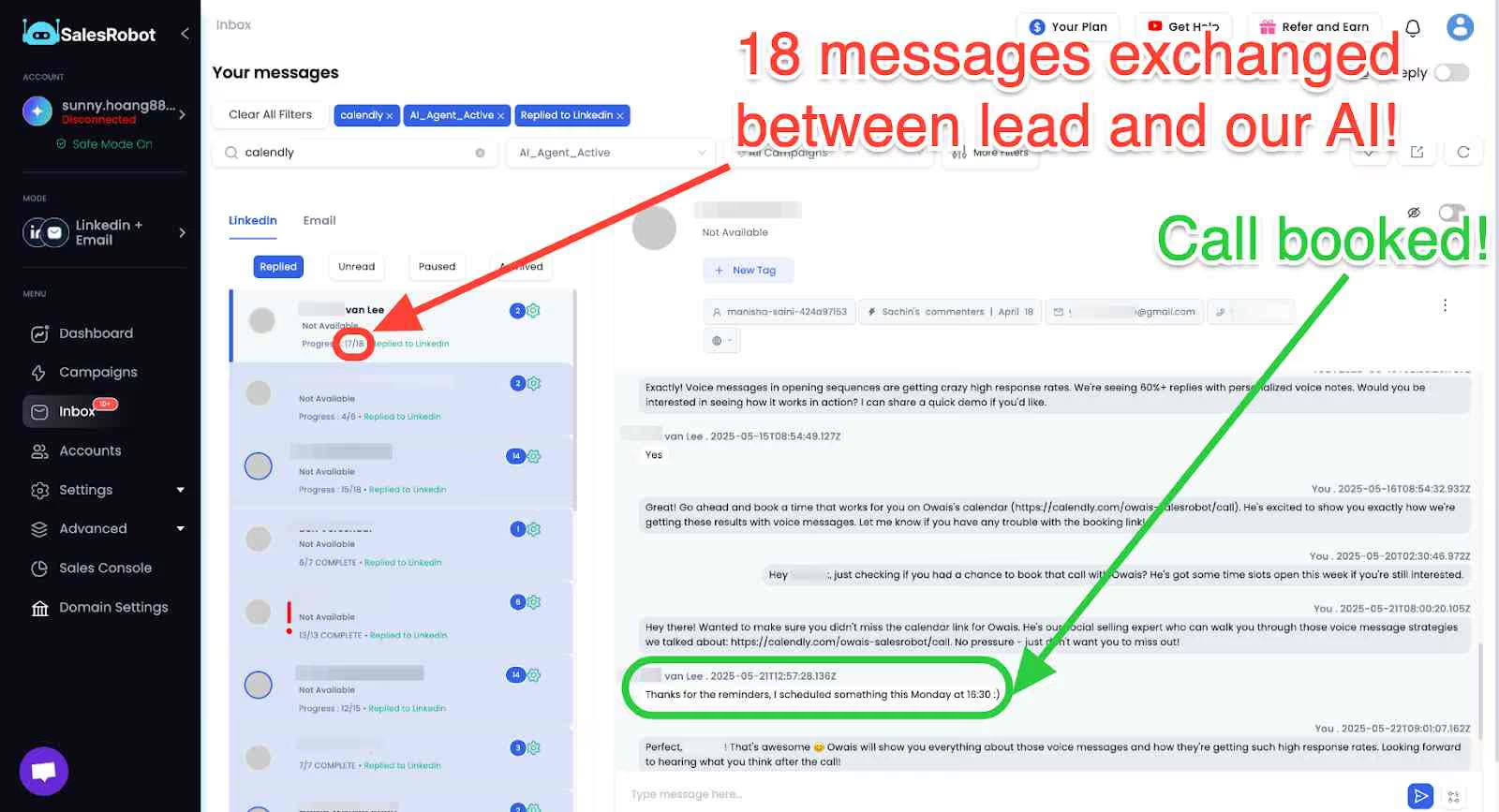
AI Appointment Setter:
- With SalesRobot, you no longer need to worry about following up with prospects.
- It now has a brain of its own, one you can train to follow up just like you would and even book meetings on your behalf.
And that's not all; SalesRobot has other note-worthy features. Let's break down those features in the pricing section.
What is SalesRobot priced at?

1. The Basic Plan - $59/month/account
- 1 LinkedIn and 1 email account.
- Import from various sources.
- Reach up to 400 prospects per month.
- Advanced dashboards and reports
2. The Advanced Plan - $79/month
All in Basic, plus:
- A/B testing.
- Personal inbox.
- Higher limits.
- Export leads.
- CRM integration via Zapier and Webhooks.
3. The Professional - $99/month
All in Advanced, plus:
- Team management
- Activity Control.
With an annual plan, you get a 35% discount. Start your 14-day free trial with no credit card required and experience the power of SalesRobot first hand.
Want a quick overview? I got you!
The following section of the TexAu review will give you the differences between TexAu and its alternative SalesRobot.
SalesRobot vs. TexAu - Who takes the lead in lead generation?

Woah, alright, folks, we've covered all the features, benefits, and disadvantages TexAu brings.
It's time to wrap up this review with a quick recap of TexAu and its best alternative.
TexAu Review Conclusion: Can TexAu Enhance Your Lead Generation Strategy?
Before we bid farewell to TexAu, let's detour to its good and bad.
TexAu is good at automating your tasks across multiple platforms.
You can create complex workflows, and it integrates with different platforms.
But TexAu is also buggy with an unfriendly UI.
Their support is subpar, and so is their use case documentation.
Some users have been left unsatisfied.
We then also discussed an alternative, SalesRobot, a tool that brings sales automation to new heights while keeping things simple.
You know, lead generation is no walk in the park.
It requires dedication, strategy, and the right tools to succeed. Let's see some statistics that might change the way you think about lead-generation tools:
Did you know businesses leveraging automation for lead generation see a whopping 53% higher conversion rate than those relying solely on manual methods?
That's the power of SalesRobot at work, driving results and boosting your top line.
With SalesRobot, you'll automate your tasks and easily reach a wider audience via LinkedIn and email.
It empowers you to engage with your prospects at scale without compromising personalization.
And SalesRobot can be the main core engine for your cold efforts as it has been for Rahul:
.avif)
SalesRobot is designed to simplify your journey. No complicated setups or confusing interfaces.
I don't want to sound like a salesperson pitching a product. So, don't just take my word for it; I invite you to start your free trial and witness the magic firsthand.
Disclaimer: The content of this blog post reflects our own opinions and judgements based on our research and experience as of published date. Comparisons made to other software or tools are for informational purposes only and are based on publicly available information and our own analysis. We do not claim absolute accuracy and encourage readers to conduct their own research to form their own opinions. While we may discuss competitor offerings, our primary focus is to showcase the features and benefits of SalesRobot. SalesRobot is not affiliated with any other software or tool mentioned in this blog post.

Wow your leads by cloning yourself and sending personalized videos and voice notes to each lead on LinkedIn.
If you don't reply to leads within 5 mins, your chances of converting them fall by 50%. Our AI replies on your behalf instantly! (and yes, you can train it)

Don't shoot in the dark. Get detailed analytics on what's working

SalesRobot allows you to invite other team members, so that they can add their LinkedIn Account, run outreach campaigns and get amazing results just like you.
.avif)


Trusted by 4100+ innovative B2B sales teams and lead gen agencies

.avif)

.avif)




.avif)


Heading 1
Heading 2
Heading 3
Heading 4
Heading 5
Heading 6
Lorem ipsum dolor sit amet, consectetur adipiscing elit, sed do eiusmod tempor incididunt ut labore et dolore magna aliqua. Ut enim ad minim veniam, quis nostrud exercitation ullamco laboris nisi ut aliquip ex ea commodo consequat. Duis aute irure dolor in reprehenderit in voluptate velit esse cillum dolore eu fugiat nulla pariatur.
Block quote
Ordered list
- Item 1
- Item 2
- Item 3
Unordered list
- Item A
- Item B
- Item C
Bold text
Emphasis

Superscript
Subscript